
Best overall: a professionally installed two-way alarm. Best for remote monitoring: a cellular-connected alarm. Best for keeping existing controls: your vehicle’s factory alarm, if equipped. This 2026 guide compares the best car alarm systems for Jacksonville drivers by warning method, installation requirements, and everyday use.
- The best car alarm systems for Jacksonville drivers match parking habits, vehicle compatibility, and the warnings you need.
- Choose a two-way car alarm for confirmation through a compatible remote; check its operating conditions before installation.
- Choose cellular-connected security for remote notifications, after checking coverage and service requirements.
- Primeaccesslocksmith provides on-site car key cutting and fob programming in Jacksonville; these services are separate from alarm installation.
Why this matters
A car alarm, an immobilizer, and a tracking system do different jobs. An alarm warns about a detected event. An immobilizer restricts starting, while a tracker helps locate a vehicle when its connection and equipment are working.
For Jacksonville drivers choosing security in 2026, the useful question is not which box has the longest feature list. It is whether you need someone nearby to hear a warning, a remote to notify you, or a phone notification while you are away.
If your immediate problem is a missing key or an unresponsive fob, Primeaccesslocksmith provides mobile key cutting and fob programming. Buying an alarm does not resolve every key, starting, or vehicle-entry problem.
What makes the best car alarm systems?
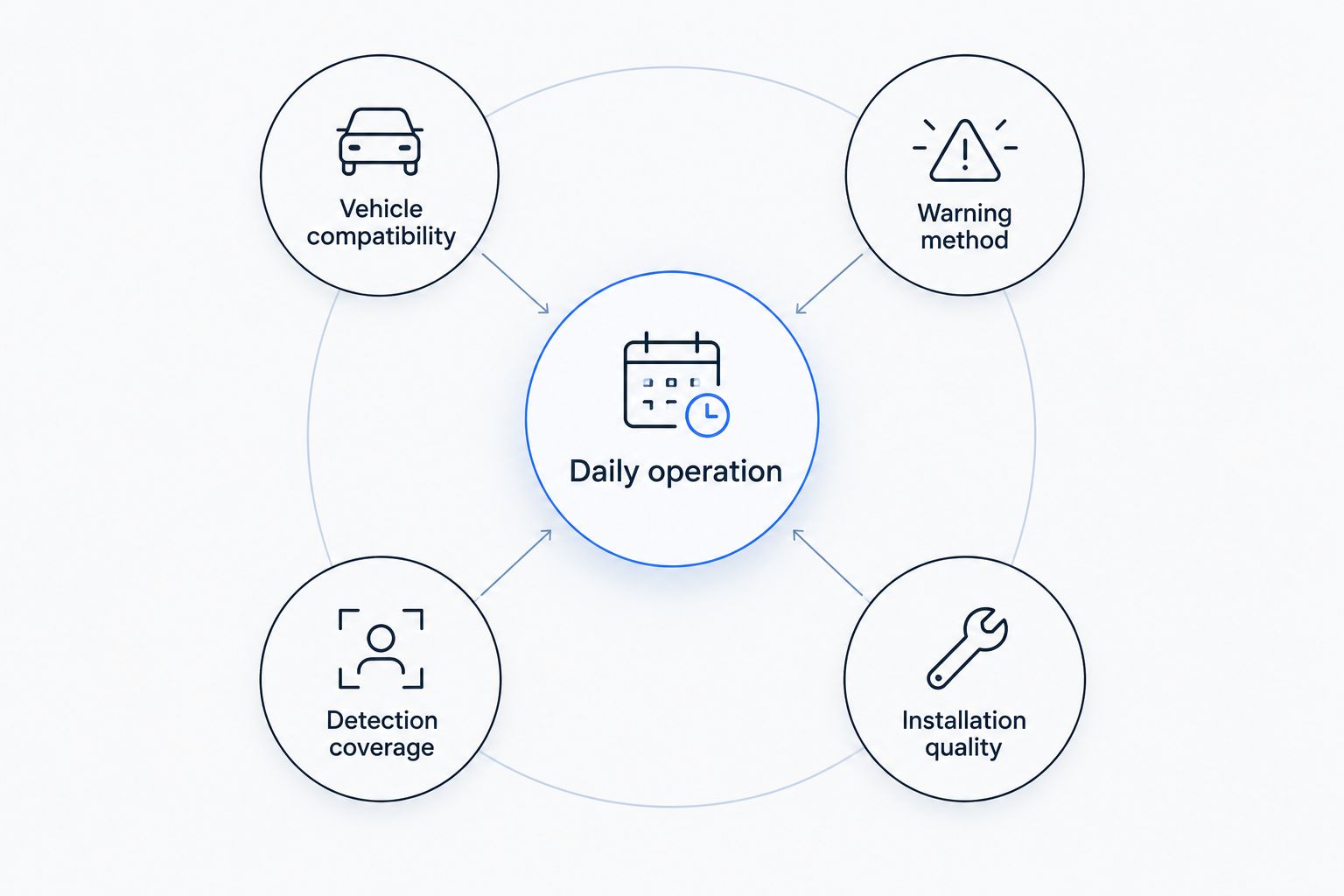
Use these criteria before comparing equipment. A feature belongs on your shortlist only when the proposed configuration actually includes it.
- Vehicle compatibility: Confirm support for your vehicle’s year, make, model, trim, and existing security equipment.
- Warning method: Decide between a local siren, a two-way remote notification, and a cellular notification.
- Detection coverage: Identify which doors, openings, impacts, or movements the installation will monitor.
- Installation quality: Require an explanation of wiring, interfaces, sensor placement, and handover testing.
- Daily operation: Check how you arm, disarm, silence alerts, and use the vehicle when a remote stops working.
Do not treat remote start, keyless entry, GPS tracking, or an immobilizer as automatic inclusions. Ask the installer to identify each function separately in the written specification.
Car alarm options at a glance
These are system types, not interchangeable product models. A single installation can combine several types; compare the actual equipment and functions in each proposal.
| System type | Best for | Standout function | Key limitation |
|---|---|---|---|
| Two-way aftermarket alarm | Drivers who want feedback through a remote | Sends supported event or status information to a compatible remote | Communication depends on range and surroundings |
| Cellular-connected alarm | Drivers who want phone notifications away from the vehicle | Sends supported alerts through a cellular connection | Depends on connectivity and service requirements |
| Existing factory alarm | Drivers who want to retain original controls | Uses the vehicle’s original security controls | Detection and notification features vary by vehicle |
| Sensor-expanded aftermarket alarm | Drivers concerned about a particular intrusion method | Adds compatible detection for specified events | Poor sensor selection or adjustment creates nuisance alerts |
| Standalone audible perimeter alarm | Drivers who primarily need a local warning | Sounds a warning when a monitored entry point triggers | Does not itself provide remote notification or location tracking |
1. Two-way alarm: best for feedback through a remote
A two-way alarm communicates with a compatible remote instead of only accepting arm and disarm commands. Depending on the system, the remote reports status or supported alarm events. Confirm exactly what the proposed remote displays or signals.
Best for: Drivers who park within the system’s usable communication range and want feedback without relying on a phone app.
Two-way alarm pros:
- Provides supported status feedback through a dedicated remote.
- Separates vehicle alerts from ordinary phone notifications.
- Offers an alternative to cellular-based notification.
Two-way alarm cons:
- Buildings, distance, and surroundings affect communication.
- An additional remote becomes another device to carry and maintain.
For a 2026 purchase, ask for a demonstration of the remote’s event notification, not just its lock button. Published maximum range does not establish whether communication will work from your apartment, workplace, or usual parking location.
Also distinguish confirmation of a transmitted command from confirmation that the vehicle completed the action. Ask the installer to explain the remote’s signals and demonstrate them during handover.
Verdict: Buy a two-way alarm when remote feedback matches where you park.
2. Cellular-connected alarm: best for remote phone notifications
A cellular-connected alarm uses a supported connection to send notifications to your phone. Some configurations also include location functions, but an app alone does not establish that tracking or theft recovery is included.
Best for: Drivers who want supported security notifications when they are beyond a dedicated remote’s usable range.
Cellular-connected alarm pros:
- Provides a notification route beyond direct remote communication.
- Places supported security information on your phone.
- Can combine notification and location functions when both are specified.
Cellular-connected alarm cons:
- Cellular coverage and service status affect communication.
- Phone permissions and notification settings need attention.
Before choosing connected security in 2026, ask which events generate alerts and whether the vehicle module needs an ongoing service arrangement. Check what still works when the connected functions are unavailable.
Account setup also matters. Establish who controls the account, how access is removed when the vehicle changes hands, and what happens if you replace your phone. A connected feature is useful only when you can operate it reliably.
Verdict: Buy cellular-connected security when remote notification is the priority.
3. Factory alarm: best for retaining original controls
An existing factory alarm is the first system to understand before replacing or supplementing it. Its operation is defined by the vehicle’s equipment and owner’s manual, not simply by the presence of a lock button on the original fob.
Best for: Drivers whose existing factory alarm already covers their required entry points and operating needs.
Factory alarm pros:
- Retains the vehicle’s original controls.
- Avoids adding an aftermarket system solely to duplicate existing functions.
- Provides a documented starting point in the owner’s manual.
Factory alarm cons:
- Features differ across models, trims, and equipment packages.
- Remote locking does not prove that an intrusion alarm is fitted.
For your 2026 security check, identify whether the vehicle has an audible alarm, an immobilizer, or both. Then identify which events trigger the alarm and how to disarm it using the documented procedure.
A flashing dashboard security indicator is not a complete feature list. Do not assume it confirms glass-break detection, tilt sensing, impact detection, phone alerts, or tracking. Verify each function separately before deciding that an upgrade is unnecessary.
Verdict: Hold off on an upgrade when the verified factory system meets your needs.
4. Sensor-expanded alarm: best for targeted detection
A sensor-expanded alarm adds compatible detection for events the basic installation does not monitor. Depending on the equipment, those events can include impact, glass breakage, or a change in vehicle angle.
Best for: Drivers who can name a specific detection gap rather than simply wanting more sensors.
Sensor-expanded alarm pros:
- Addresses defined gaps in the proposed alarm coverage.
- Allows the installation to focus on particular events.
- Supports a clearer conversation about sensor placement and adjustment.
Sensor-expanded alarm cons:
- Excessive sensitivity causes nuisance alerts.
- A sensor detects a specified event; it does not physically stop that event.
Start with the event you want detected. Ask the installer which sensor addresses it, what causes that sensor to trigger, and whether its settings can be adjusted after installation.
Do not request maximum sensitivity as a substitute for a proper setup. Require a controlled demonstration and instructions for dealing with repeated unwanted warnings. The goal is meaningful detection, not an alarm that sounds whenever normal activity occurs around the vehicle.
Verdict: Buy targeted sensors only for clearly identified detection needs.
5. Audible perimeter alarm: best for a local entry warning
A standalone audible perimeter alarm sounds a warning when a monitored entry point triggers. The installation specification should identify whether that means doors, the trunk, the hood, or another supported opening.
Best for: Drivers who want an audible warning at the vehicle rather than remote status or phone notifications.
Audible perimeter alarm pros:
- Keeps the primary function focused on a local warning.
- Makes monitored entry points straightforward to specify.
- Avoids making an app essential to the warning function.
Audible perimeter alarm cons:
- You must be nearby to hear the warning yourself.
- A siren does not provide vehicle location or guarantee intervention.
Choose this option for what it actually does. Do not mistake remote arming for remote notification: a remote that locks the vehicle does not necessarily receive an alert when the alarm activates.
Ask how the alarm handles an authorized entry using a mechanical key and what disarming procedure applies if the remote fails. Those everyday details matter more than an impressive list of unrelated convenience functions.
Verdict: Buy an audible perimeter alarm when local warning is sufficient.
How to check an installation proposal
For a 2026 installation, get 1 written specification identifying the equipment, monitored events, notification methods, and supported vehicle functions. Avoid a proposal that describes everything simply as a security package.
Complete 3 handover checks with the installer:
- Arming: Confirm the normal arm and disarm procedure and the meaning of its confirmation signals.
- Detection: Ask for a controlled demonstration of the agreed monitored events.
- Recovery: Learn the documented procedure for a failed remote, interrupted connection, or nuisance alert.
If you have 2 working keys, bring both and check their normal operation after installation. Also test the existing functions you use, including locking and starting. Report a new fault before treating the installation as complete.
Keep the operating instructions somewhere other than solely inside the locked vehicle. Do not publish override instructions or security credentials where other people can access them.
How the options rank
This ranking follows warning method, vehicle compatibility, detection coverage, installation requirements, and daily operation. It compares system types rather than claiming hands-on testing of individual products.
Two-way alarms take the default slot because they add remote feedback without making phone notifications the central requirement. Cellular-connected systems take the remote-monitoring slot. Existing factory alarms remain the right starting point when their verified functions already fit the job.
Which car alarm system should you choose?
Choose a two-way alarm as the default, then change that choice when your parking habits demand a different warning method. Choose cellular connectivity for notifications beyond direct remote range, or retain the factory alarm when it already meets your requirements.
Keep alarm selection separate from key service. Primeaccesslocksmith is best for Jacksonville drivers who need on-site car key cutting or fob programming. A key problem calls for diagnosis, not an automatic alarm replacement.
Get help with car keys
On-site car key cutting and fob programming for Jacksonville drivers.
FAQ
What's the best car alarm system for Jacksonville drivers?
A professionally installed two-way alarm is the default choice when you want feedback through a dedicated remote. Choose cellular-connected security instead when phone notifications beyond direct remote range are your priority.
Is a factory car alarm enough?
A factory alarm is enough when its verified detection and warning functions meet your needs. Check the owner's manual and equipment details before assuming that remote locking includes an intrusion alarm.
Will a car alarm stop someone from stealing my vehicle?
A car alarm warns about detected events; it does not guarantee theft prevention. Treat alarms, immobilizers, and tracking as separate functions and verify which ones your vehicle actually has.
Is a two-way car alarm the same as a phone-connected alarm?
No. A two-way alarm communicates with a compatible remote, while a cellular-connected alarm uses a supported connection for phone notifications. Some installations combine both functions.
Can I add an alarm to a car with keyless entry?
An alarm can be added when suitable equipment and installation methods support the vehicle. Ask the installer to confirm compatibility with the exact year, make, model, trim, and existing controls.
Should I choose the most sensitive shock sensor?
Choose appropriate adjustment, not maximum sensitivity. Require a demonstration of the intended detection and ask how nuisance alerts will be corrected.
Can Primeaccesslocksmith help if my car key or fob stops working?
Primeaccesslocksmith provides mobile car key cutting and fob programming in Jacksonville and surrounding areas. Describe whether the problem involves entry, starting, or remote buttons so the service request identifies the actual issue.
One last thing
Test the warning you expect to receive, not just the sound the car makes. A siren demonstration does not prove that a remote or phone receives the event. Before accepting an installation, check the complete warning path under controlled conditions with the installer.